

After a long development, a ton of rewrites, experiments and more architectural changes than I can reasonably summarize here, the first public Alpha image of Sinty OS is finally available. This is a huge milestone. Seeing all my ideas coexisting inside the same hardened OS, from a custom boot chain to a custom desktop environment, matters a lot to me.
So let’s have a party 🥳!
But before proceeding with it, please put down your USB stick and take 5 minutes to listen to me some more. It will be worth it, I promise.

So what is really so different that requires so many warnings?
Well…
Sinty OS is Linux-based, but it is not a Linux distribution
This distinction is not about terminology, marketing or some strange obsession with refusing the word “distribution”. It describes the architecture.
Sinty OS uses the Linux kernel because Linux provides an excellent hardware abstraction layer, mature drivers and decades of engineering. It also uses several existing open source libraries and userspace components where doing so makes sense.
But Sinty OS is not built by taking Debian, Fedora, Arch or another distribution and changing its theme, package selection and defaults. Instead, the system around the kernel is being designed specifically for Sinty.
This includes its:
- bootloader and boot process
- early userspace and init
- system-image deployment model
- update and rollback system
- recovery environment
- authentication stack
- storage encryption model
- permission broker
- application runtime
- desktop environment
- system services and native applications
And so on…
Linux is the kernel, not the architecture.
That does not mean every existing Linux component is bad or that everything must be rewritten for ideological reasons. Rebuilding software only for the sake of saying that it is custom would be pointless.
Components are replaced when the traditional model conflicts with the security, reliability or usability goals of the system, or when an existing component is simply too broad, too mutable or too much for what the project actually needs.
The clearest example is the boot architecture, because almost everything else in Sinty OS starts there.
The boot chain is the architecture
The core idea behind Sinty OS is not simply having an immutable root filesystem.
The core idea is that Sinty OS boots from a set of independently handled and independently verifiable image files.
The operating system is divided into three primary image classes:
- Kernelcache, containing the Linux kernel, the initramfs, the signed kernel command line and the early-boot logic.
- Root, containing the complete immutable Sinty OS userspace.
- Firmware, containing hardware-specific firmware bundles mounted over a minimal built-in survival firmware set.
Recovery is distributed as its own self-contained kernelcache and participates in the same verified boot model.
These images are not conventional installations, and they do not require a permanently assigned partition for every version, slot or rollback state.
This is one of the greatest advantages of the entire architecture.
Sinty OS does not need a rigid partition layout with root-a, root-b, vendor-a, vendor-b, fixed slot sizes and an updater permanently coupled to those partitions.
Atom Loops, which is the name behind this whole architecture, works with image files. An active image, a pending image and a rollback image can coexist as files inside the system storage, allocating space dynamically rather than on a fixed slot. The deployment protocol is defined by signed manifests, verified artifacts and transactional state, not by the physical position of partitions on the disk.
The current public Alpha disk image still uses a small GPT layout to provide the ESP, the initial root image, its hash tree and persistent storage. A computer obviously still needs storage and an EFI System Partition from which the firmware can begin booting, but the important distinction is that the update and rollback architecture does not require one dedicated partition for every system generation.
Keeping it short: the operating system generation is an image file, not a partition.
A new root can be staged beside the active root. A previous root can remain available as rollback. A pending kernelcache can sit next to the stable kernelcache. None of these transitions require repartitioning the disk or rewriting the layout of the machine.
Sinty OS does not boot “a Linux installation” in the traditional sense, it boots a verified kernelcache, which then discovers, verifies and mounts the selected operating-system image.

What actually happens during boot
The machine firmware starts the custom Atom Loops UEFI loader, which reads the current boot state and decides what should run: the stable deployment, a pending trial, the rollback version or the recovery environment.
It does not simply execute whichever EFI file happens to be present. Before chainloading a kernelcache, the loader verifies the release trust chain and checks that the selected version is not older than the anti-rollback floor stored by the system.
The trust model uses two levels of keys:
- a cold root key signs operational certificates and revocation information
- an operational signing key signs release manifests and boot artifacts
This lets the everyday signing key be rotated or revoked without replacing the root of trust embedded in the system.
The anti-rollback check matters because a valid signature only proves that an image was legitimately released, not that it is still safe to run. Without version enforcement, someone could restore an older, correctly signed deployment containing a known vulnerability. It took me a while to properly account for this, but it is a real attack surface.
The selected kernelcache is a Unified Kernel Image containing the Linux kernel, the Sinty OS initramfs, the signed command line, its version metadata and everything needed to continue the verified boot process.
Once the kernel starts, the initramfs discovers the selected root deployment, attaches its image and hash tree, opens it through dm-verity and mounts the authenticated EROFS filesystem read-only.
The complete chain is:
UEFI firmware → Atom Loops loader → signed kernelcache → Sinty initramfs → dm-verity verified root image
The loader authenticates the kernelcache, while the kernelcache carries the trusted root hash that the initramfs uses to verify the root image. Only after that verification succeeds can the operating system be mounted and executed.
If verification fails, Sinty OS does not silently mount the same filesystem without dm-verity just to keep booting, a corrupted, incomplete or modified root image makes the boot fail entirely.
After mounting the trusted root, the initramfs prepares the writable portions of the system, mounts persistent data, creates the necessary overlays and finally hands execution to Sinty’s init (all of this in a very limited time frame, boot is expected to be faster than an Ubuntu 26.04 but do not take this as a benchmark).
This is why the boot chain is not merely an implementation detail. The loader, updater, kernelcache, root image, recovery environment, TPM state and deployment lifecycle all need to agree on what the machine is allowed to run, or the whole chain just returns K.O.
Learn more about this here.
Firmware is an image too
Firmware is intentionally separated from the root operating system.
Sinty OS includes a minimal survival firmware set inside the verified root image, providing a known fallback that is sufficient to preserve a basic boot path. Additional hardware support can then be distributed through independent and versioned firmware image bundles.
Every bundle has its own image, hash tree, version, signed release anchor and dm-verity verification. During early boot, Sinty verifies each bundle separately and mounts the valid ones over the built-in firmware set.
As for the whole chain, an invalid bundle is never mounted, but an optional firmware failure must not brick the entire machine. That creates a deliberate difference between the root and firmware policies:
- root verification fails closed
- an optional firmware bundle falls back to the built-in survival set
The root is the trusted operating system, so booting an unauthenticated copy would break the security model. A firmware add-on is optional hardware support, so Sinty can safely skip it and continue with the verified base set, this also means firmware can be updated independently without rebuilding the complete root image or turning every hardware compatibility issue into an unbootable system.
We will distribute the following firmware bundles (in the next days, just the time of testing them):
| bundle | source | for |
|---|---|---|
nvidia | proprietary GSP firmware from the NVIDIA .run | dedicated NVIDIA GPUs |
amd | linux-firmware/amdgpu/ (AMD official) | dedicated AMD GPUs |
Each dedicated GPU is its own image. Extra Wi-Fi is deferred for now (ath and
rtw stay in the base).
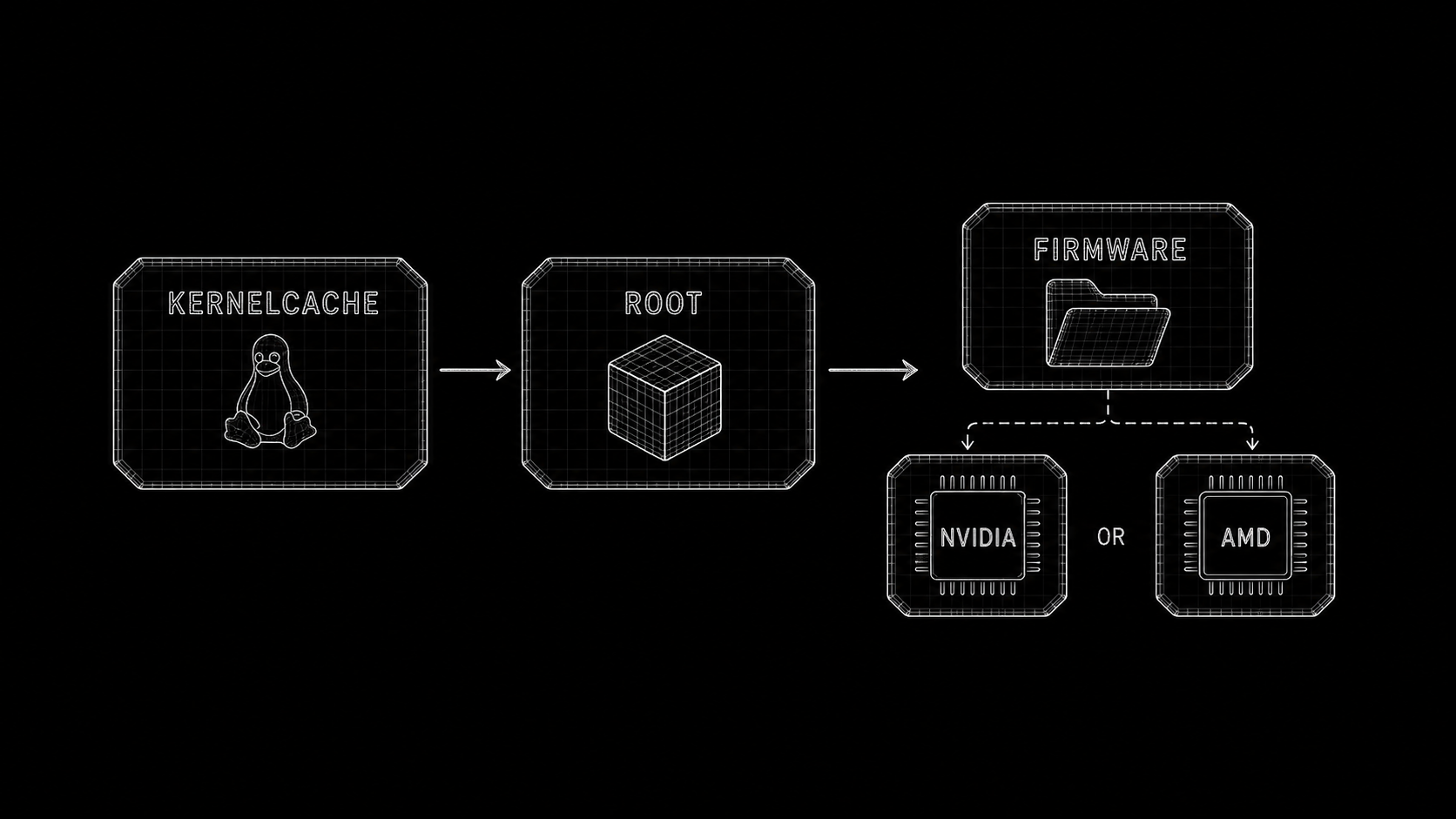
The NVIDIA GSP firmware is NVIDIA-licensed: the factory downloads the .run and extracts gsp_*.bin at build time, into .tools/ and the built bundle only. It is never committed or pushed. AMD firmware is redistributable, so we take it directly from linux-firmware.
Updates and boots are the same transaction
Downloading a new deployment does not immediately replace the operating system currently running.
Atom Loops verifies the release metadata, downloads the required artifacts, verifies them again and stages the new images beside the active deployment. The current system remains untouched while the intended transition is recorded in a write-ahead deployment state.
At the next restart, the loader selects the pending kernelcache and the initramfs verifies and mounts the corresponding root. The new deployment remains a trial until it completes enough successful boots to be promoted to stable.
If the attempt counter runs out, Atom Loops returns to the last known good deployment or enters recovery.
This means the updater does not get the final word. It can download and stage an image, but the boot chain independently decides whether that image is valid and actually capable of running.
A deployment is therefore not successful because its files arrived on disk. It becomes successful only after it has passed the same verified path used for every normal boot.
Recovery follows the same design. It is not an emergency shell copied into the normal root, but an independently signed and self-contained kernelcache that the loader can select when the active deployment cannot continue safely.
Learn more about this here.
Why not use Debian directly?
This is probably one of the most obvious questions.
Sinty OS can run Debian software through ush, and the pkg command resolves software from Debian repositories using APT. Projects such as Vanilla OS, which I founded, and many others are also based on existing distributions while offering reliability, atomicity and security.
So why not do that again?
The answer is hardening. The fallback answer is architecture.
A traditional Debian installation is designed to be a general-purpose and mutable operating system. Packages can modify the root filesystem, install services, execute maintainer scripts and gradually change the state of the machine.
Vanilla OS and similar systems solve much of that problem by making the distribution immutable and delivering it transactionally. It is a mature and valid approach: packages and their dependency graph are assembled into an OCI image, verified, reproduced and served atomically to the user.
Sinty OS starts from a different boundary.
It is built like one piece of software, in one reproducible build run. The kernelcache, root image, initramfs, firmware policy, system services, recovery environment and release metadata are produced together as parts of the same operating system, rather than emerging as the final state of a general-purpose package transaction.
This is not a criticism of Debian, Vanilla OS or OCI-based systems. They solve a different problem and start from a different architecture.
In a distribution-based system, the distribution remains underneath everything. Its packages, service conventions, compatibility requirements and package-manager assumptions still define the system, even when the final result is delivered as an immutable image.
In Sinty OS, the boot protocol, image format, trust chain, init, permission model, recovery process and application boundary define the system. There is no complete general-purpose distribution underneath that Sinty must preserve.
That makes choices possible which would be unreasonable for Debian itself:
- no traditional host package manager
- no maintainer scripts modifying the running root
- no requirement to support arbitrary host services installed by packages
- no traditional Unix password database
- no reusable host password hash
- no
sudo,pkexecorrun0 - no general-purpose path to host root
- no fixed partition for every active, pending or rollback generation
- no assumption that applications deserve the same trust as the operating system
The host is a controlled and verifiable image, not a package database that slowly evolves in place. Its root remains read-only, and updates arrive as complete signed deployments.
Debian is still incredibly valuable, but here it serves as an application ecosystem rather than the architecture of the host.
ush gives Sinty access to that ecosystem without granting every Debian package the same filesystem view, authority or trust as the operating system itself. Its APT configuration is the only strict Debian dependency, while the Sinty host underneath does not need to be Debian at all.
Debian exists inside the application boundary. It is not the foundation beneath the trusted operating system.
We’ll return on ush and the sudo/pkexec/run0 topics in a minute.
Atom Loops and the system-image model
Sinty OS does not update itself by replacing packages inside the running root filesystem. It uses Atom Loops, an image-based deployment engine that consumes completed operating-system artifacts and owns their verification, staging, activation, promotion and rollback.
Atom Loops is not a distribution and it is not a package manager.
An update is processed as one transaction:
- obtain the revocation information
- fetch the signed release manifest
- verify the operational certificate against the release root
- verify the manifest and every declared artifact
- download the required images
- verify the downloaded data again
- stage it without modifying the active system
- record the transition in the write-ahead deployment state
- trial the pending deployment during the next boot
- promote it only after successful boots
- return to the last known good state if it cannot stabilize
The root image is protected by dm-verity, and active, pending and rollback generations can coexist without requiring a dedicated partition for each one.
A failed update must never leave behind an undefined mixture of old and new files. The previous deployment remains a complete, understandable and bootable unit.
This is one of the main reasons Sinty OS cannot honestly be described as Debian with a custom desktop. The lifecycle of the operating system itself is different.
Learn more about this here.
Why a PIN instead of a password?
Sinty OS does not use the traditional Unix password model, and there is no /etc/shadow containing a reusable password hash for the user account.
Instead, each user has an encryption key sealed inside the TPM, the machine’s security chip. The PIN authorizes the TPM to release that key.
The important difference is that the PIN has little value on its own. It is not a conventional password hash that can be copied from the machine and attacked indefinitely somewhere else.
Something you know, the PIN, unlocks something physically bound to the machine, the TPM-sealed key.
When the correct PIN is entered, the custom pam_sinty module asks the TPM to unseal the user key. That key authenticates the session and unlocks the encrypted user data.
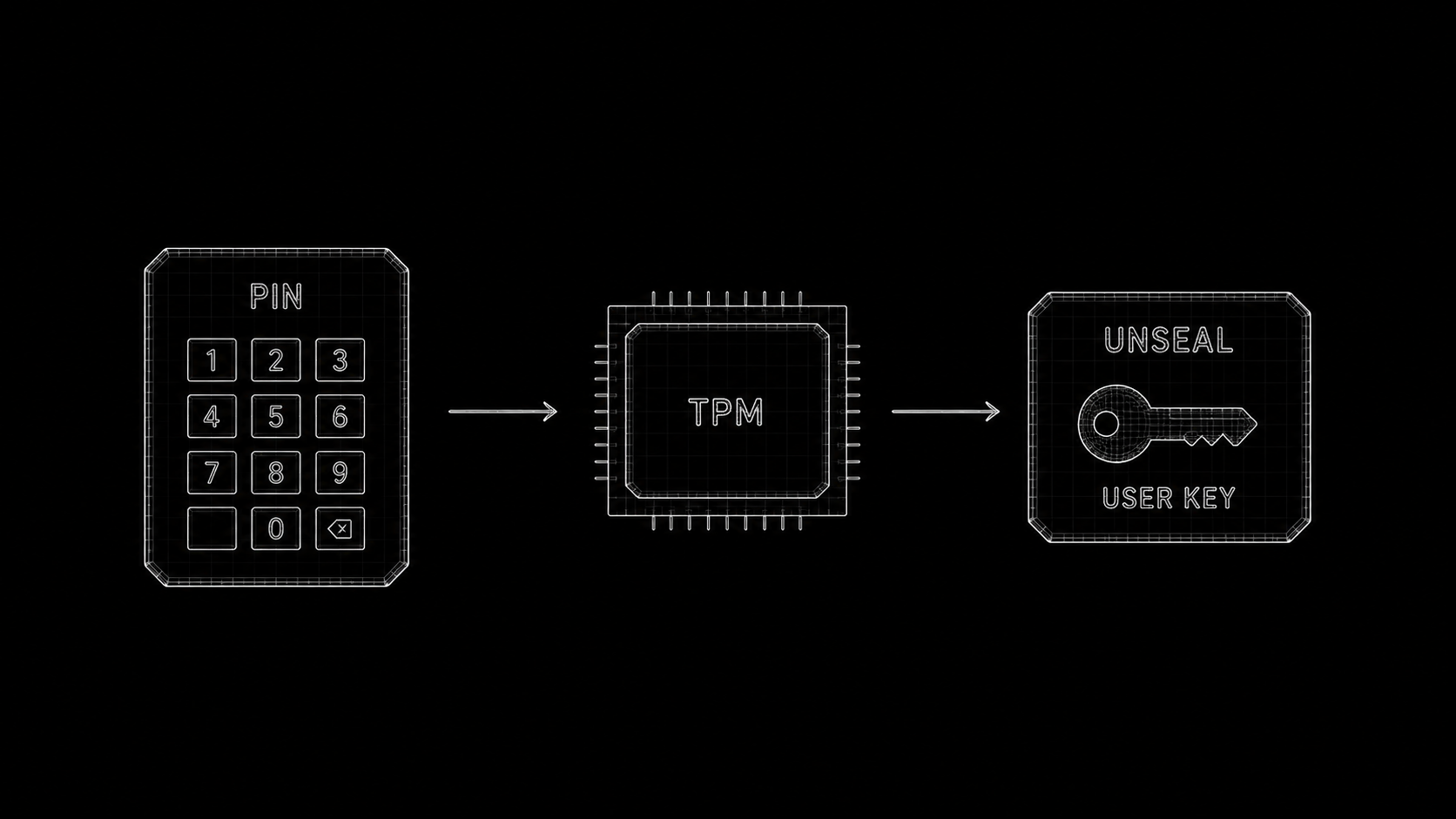
An attacker who copies the storage device does not obtain a reusable password verifier for offline cracking. The sealed key belongs to the original TPM, which also throttles repeated incorrect attempts.
A separate recovery key covers situations such as a forgotten PIN or a reset TPM.
Using a PIN is therefore not about replacing a strong password with a weaker four-digit secret. It is about refusing to treat the typed secret as the entire authentication factor.
Learn more about this here.
Why is TPM 2.0 mandatory?
Basically because of the text above, it’s a requirement for the pam_sinty, but let me add some more details.
TPM support is not an optional security feature attached to the system after the architecture was designed. It is part of the identity, encryption and anti-rollback model.
Without it, Sinty OS would need a fundamentally different design based on stored password hashes, software-protected secrets or rollback state kept beside the same images it is supposed to protect.
That would not be Sinty OS with one disabled feature. It would be a second system with a weaker trust model.
Making TPM optional would mean maintaining two architectures: one where identity, user keys and accepted deployment history are bound to the machine, and another where they are not.
I do not want the secure path to become the unusual configuration while the weaker compatibility mode silently becomes the normal one.
TPM 2.0 is therefore a platform requirement. It reduces the amount of supported hardware, especially during this Alpha, and that is an intentional trade-off.
Learn more about this here.
Why there is no sudo, pkexec or run0
Traditional desktop Linux systems generally allow an application or shell process to request root privileges. The implementation differs between sudo, pkexec and run0, but the broad idea remains similar: a process crosses a privilege boundary and receives extensive authority over the host.
Sinty OS avoids that model.
Applications and interactive shells should not receive a general-purpose host-root context, and a compromised application should not be able to turn one authorization prompt into unrestricted control of the machine.
Privileged actions instead pass through narrowly scoped services and a host-side permission broker. The guest requests a specific operation, the broker evaluates it against policy and only that capability is exposed.
This provides a single place to request user approval, restrict the operation, audit it, remember or revoke permissions and reject actions that must never cross the boundary.
The goal is not to make the user powerless. It is to stop making every tool that needs one privileged action temporarily omnipotent.
Root is possible, but on purpose (and not yet)
Refusing sudo does not mean the machine is sealed away from its owner forever. The design is that root is not lying around for any process to grab, while you can still take it deliberately, closer to unlocking an Android bootloader than to typing a password: you arm the unlock in settings with your PIN, reboot into recovery, and confirm twice. The device then wipes your data, flips a hardware-anchored lock bit and turns off verified boot, so the read-only system can be opened up and a root shell used. An unlocked device warns at every boot and steps outside the guarantees above, so it is strongly discouraged for anything you rely on.
To be honest about this Alpha: that unlock path is designed but not implemented yet, so there is no way to root a device in this release. When it lands, the full flow and its consequences will live in Rooting Sinty OS.
Learn more about this here.
What ush actually is
ush is not merely the terminal emulator or the default command-line shell of Sinty OS. It is a secure application runtime, a shell and what I describe as a small user operating system layered on top of the host.
Inside it, users can install and run conventional Linux software while the Sinty OS host remains immutable.
The environment combines user, mount, PID, network, IPC and UTS namespaces with Landlock, seccomp filters, seccomp-notify supervision and explicit broker mediation.
Its visible root filesystem is assembled as an overlay. The immutable host provides the read-only lower layer, while changes made inside ush are written into separate guest layers. Paths such as /etc, /var, /run, /proc and the user’s files are exposed according to specific policies instead of giving the guest an unrestricted view of the host.
Even the root user inside ush is not the real host root. It is mapped through a user namespace and cannot take general control of Sinty OS.
This is how ush can provide a familiar Debian environment without making Debian the base operating system.
Inside ush, Debian provides compatibility. Outside it, Sinty remains the authority.
Learn more about this here.
Packages as layers
The pkg command resolves and downloads packages from Debian repositories, but installs them into controlled layers rather than modifying the host.
For example:
pkg install htoppkg install --one-time htoppkg inspect htoppkg diffpkg remove htoppkg burn htopPackages can be persistent, temporary for one session, inspected, compared against the base, removed by discarding their layer or promoted from an ephemeral layer to a persistent one.
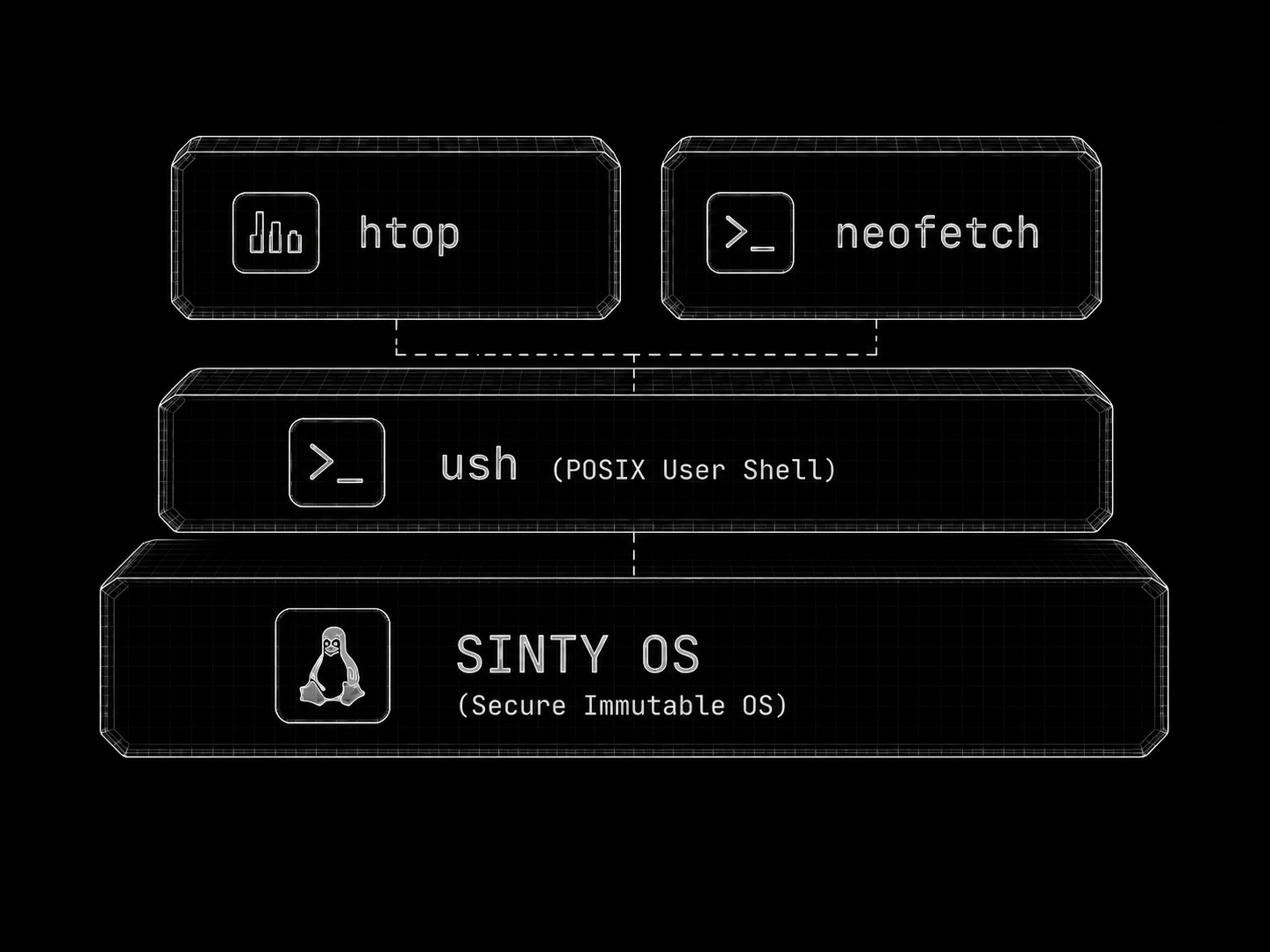
This makes installation reversible and observable, while preserving a clear distinction between the trusted operating system and software chosen by the user.
A Debian package does not automatically become a trusted Sinty OS component merely because it came from a repository. It remains application-layer software inside the ush boundary.
Learn more about this here.
Secure, but not unusable
Designing a highly restricted system is easy when nobody is expected to do anything with it. That was never the goal.
Sinty OS aims for extreme security and freedom at the same time. The difficult part is defining freedom without returning to a model where every application can modify every part of the machine.
ush is deliberately closed toward the host but flexible within its own environment. Users can install packages, customize the guest, run command-line software, create persistent setups and explicitly share directories through broker-managed permissions.
For development work that legitimately requires more freedom, the same runtime provides dsh, its developer profile. It is the same shell and the same layer-based packages as ush, but on a profile that opens up what the sandbox keeps shut: rootless Podman and Distrobox, /dev/fuse and a subordinate id range, so container-based tooling actually works from inside it. It trades some isolation for that power.
dsh is explicitly not a security boundary. It is the profile you step into on purpose to build and test containers, while every ordinary application stays in the contained ush environment.
That distinction allows the standard environment to remain strongly contained while developers consciously enter a more powerful profile, rather than weakening every normal application.
The system should not make people feel blindfolded and tied to a chair, but it should also stop pretending that unrestricted host mutation is the only possible definition of user control.
Learn more about this here.
Recovery is part of the operating system
Sinty Recovery is not an emergency shell added as an afterthought. It is a separate environment participating in the same deployment and trust model as the rest of the system.
Its independently signed kernelcache can be selected directly by the custom loader. If the normal deployment cannot boot, cannot be promoted safely or contains a damaged root, the machine still has a known path toward diagnostics, repair and verified reinstallation.
Recovery does not depend on trusting the root image it may need to repair.
This area remains under active development and should still be considered experimental in the current Alpha.
Learn more about this here.
Singularity Desktop
Sinty OS ships with Singularity Desktop, a Wayland desktop environment built with GTK4 and the labwc compositor. It includes the shell, panel, dock, overview, workspaces, notifications, settings, lock screen, greeter, portals and a growing collection of first-party applications based on libsingularity.
Singularity Desktop is a component of Sinty OS, but Sinty OS is not the only way it should be used.
The desktop is an independent open source project. Its build system supports standard installation prefixes and it is not intentionally tied to Sinty OS internals. A NixOS recipe is already maintained by a member of the community.
I am also actively looking for a conventional Linux distribution willing to believe in the project and provide an official Singularity Desktop spin or edition. I am available to support the integration, work with maintainers and collaborate on making it feel native there.
At the moment, “we” mostly means me, which makes that collaboration even more important.
Sinty OS targets a very specific security and deployment model. It can work extremely well for someone who buys a laptop with Sinty preinstalled, turns it on and uses it without necessarily knowing what Linux is.
It is not necessarily the ideal operating system for every “btw, I use Linux” user.
Many experienced Linux users enjoy unrestricted host access, replacing core components, switching kernels every afternoon and treating the installation itself as an ongoing project. Sinty deliberately limits parts of that workflow to protect the integrity of the machine.
Singularity Desktop should not inherit that limitation.
People who like the desktop but want a conventional Fedora, Debian, Arch, openSUSE or NixOS system underneath should be able to have exactly that.
Learn more about this here.
Memory that tiers itself
One more piece worth calling out, because it runs from the moment the system boots and you never have to think about it: Sinty OS treats memory as tiers instead of one flat pool. The pages you are actively using stay in fast RAM, while pages that have gone cold are moved down to a slower local tier, so the memory in front of your work stays free. When memory gets tight, the machine relieves the pressure by tiering cold pages out instead of thrashing or killing an app, and a page that was tiered out is brought back correctly the instant it is needed.
This is the Memory Tiering Standard (MTS), a project developed alongside Sinty OS. It is not swap and it is not a compression trick. It gives each page an explicit cost and places it against declared tiers with measurable targets, with the kernel guaranteeing the system always makes forward progress and never loses your data. It is on by default, from the first boot, with nothing to configure.
Learn more about this here.
The broader architecture
Several projects are being developed around Sinty OS:
- Atom, for native system services and orchestration
- Atom Loops, for transactional file-based deployment, verified boot and rollback
- Sinty Crypto, for TPM-sealed authentication and encrypted user data
- Sinty SDB, the debug bridge for connecting a development host to a device
- Sinty Recovery, for the independent recovery environment
- ush, for contained Linux applications and development environments
- Singularity Desktop, for the graphical experience
- Memory Tiering Standard, an experimental architecture for explicit and measurable memory-tier management
Not every component is complete, and not every planned integration is active in this first image.
This Alpha is the first public checkpoint, not the finish line.
Why build all of this?
Many problems attributed to Linux desktops are not kernel problems. They come from accumulated assumptions around mutable hosts, ambient authority, package scripts, reusable passwords, unrestricted privilege elevation, rigid deployment layouts and system state that becomes harder to explain over time.
Sinty OS is an attempt to question those assumptions together instead of patching them one at a time.
The objective is an operating system that is predictable, reproducible, verifiable, difficult to corrupt, recoverable after failed updates, secure without requiring the user to become a security expert and useful without exposing the host to every application.
It should also be able to deploy and roll back complete operating-system generations without dedicating a permanent partition to each one.
This does not require rejecting Linux. It requires treating Linux as the kernel and being willing to rethink what surrounds it.
Alpha means Alpha
At this stage, expect incomplete functionality, unsupported hardware, rough edges, breaking changes, unstable APIs, unfinished installation flows, debugging output and regressions between nightly builds.
Recovery has not yet been validated across enough hardware either.
A successful boot on one machine does not prove that the image will boot on yours, and a successful installation does not mean every update or recovery path is already safe.
If something breaks, that is expected. Please report it with as much information as possible, including your hardware, boot logs and the exact image version.
We need feedback
This release exists so that we can discover what cannot be discovered on my machine or inside QEMU. Every boot report matters, including successful ones.
Every bug, crash, incompatible device, confusing interaction and criticism helps define what Sinty OS must become.
People have been waiting for this image for months. It is still early, imperfect and incomplete, but it is finally something that can be booted, tested and discussed outside the development environment.
Thank you to everyone who followed the project, tested early builds, contributed code, maintained external recipes or simply kept asking when the first image would be available.
Welcome to the first public Alpha of Sinty OS.
You can download the current nightly image here:
https://github.com/singularityos-lab/os/releases/tag/nightly
Flash it with GNOME Disks or dd. Rufus and Ventoy are known to fail.