

The headline this time is not something you can see in a screenshot. I pulled all the system plumbing out of the shell and put it in its own library. It is the least flashy thing I have shipped and probably the one that will matter most over time. On top of that the Bluetooth and Wi-Fi toggles finally listen to you, the device list keeps up, and the square corners that kept creeping into apps are gone.
One library became two
Every Singularity app links one library, libsingularity, for the widgets and the window chrome. The trouble was that the shell also carried about twenty system managers inside it, Bluetooth, audio, power, brightness, network, the lot, all tangled into the same tree as the panel and the dock.
So I split them out. There is a second library now, libsingularity-system, built from the same source tree but linkable on its own. The shell links both. An app that only wants the toolkit, a text editor say, links just libsingularity and never drags in NetworkManager, PulseAudio or UPower behind it. Same Singularity namespace across both, the split is gated behind a build option, and the desktop looks and behaves exactly as it did, this is purely about where the code lives and what each app has to carry.
Why bother, since nobody sees it: lighter apps that do not pull half of systemd to draw a window, one place to optimise a backend instead of hunting through the shell, and a clean rule for where new code goes. While I was in there I also lifted the pure bits that were buried inside settings pages, the colour maths, the file parsers, the small layout helpers, into their own home, so those pages got noticeably thinner. It is the kind of work that pays back slowly, but the rest of this post sits on top of it.
Toggles that listen
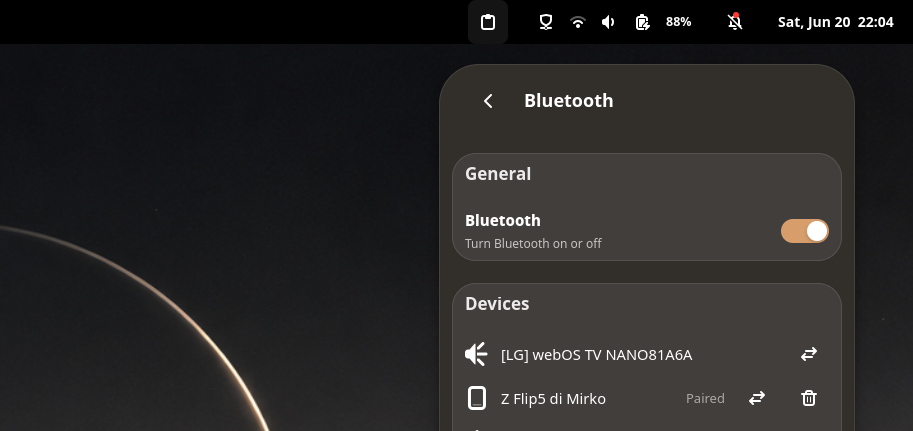
The Bluetooth toggle in the quick settings did nothing. You would click it and the desktop would shrug, and you had to open the full Bluetooth settings to actually turn it on or off. It turned out the toggle was waiting on a property change signal from BlueZ that, on a fair number of adapters, simply never arrives, so the interface never heard that anything had happened.
Now it reflects what you asked for the moment you ask, and lets the daemon correct it later if it ever disagrees. The Wi-Fi toggle had the same shape of problem and got the same treatment, the interface updates instantly while the radio itself is still driven the safe way underneath (github.com/…/issues/175).
A device list that keeps up
The Bluetooth settings list would update for the first few seconds and then freeze, and worse, a device you powered off would just sit there forever because nothing was watching anymore. Now the list reconciles itself against what BlueZ actually reports on a short timer while the page is open, and keeps the scan alive, so it adds and removes things the whole time you are looking at it (github.com/…/issues/178).
No more square corners
This one had beaten an earlier fix, so I went back to the start. Singularity app windows are rounded by a frame that clips its contents properly, so the corners were never the content’s fault. The culprit was the window’s own shadow: it was being drawn as a square behind the rounded frame, and the square peeked out past the curve as a pale corner. Matching the shadow’s radius to the frame made it line up, and the corners are clean now, on app windows, menus and popups alike (github.com/…/issues/158, github.com/…/issues/188).
Still on it
A couple of honest loose ends. In floating autohide the dock surface still spans the whole width for input, so clicks on the empty sides land on the dock instead of passing through, I had a fix for it that broke the hover reveal, so I reverted it and I am rethinking the approach rather than shipping something that breaks worse than the bug (github.com/…/issues/211). Disabling Wi-Fi can still make the shell sluggish for a moment, which is a different problem from the toggle and I am still chasing it (github.com/…/issues/73). And carried over from last time, the pixelated fonts in some Java and recording apps.
If you run Singularity and something is off, tell me, open an issue on GitHub or find me on Discord. The reports from machines that are not mine are what keep this honest.