

I asked people to break the first public Alpha, and they did not waste time.
The reports came back with a dock that swallowed clicks outside its own body, previews that appeared only when they felt like it, windows returning to the wrong monitor, Wi-Fi taking the shell down with it, games borrowing another app’s icon and folders that needed to be reopened before they admitted anything had changed.
Good, because those are exactly the bugs I cannot find while the desktop keeps meeting the same hardware, files and habits on my desk. In two weeks I closed twenty reported issues across the shell, compositor, toolkit, session and Files, where some fixes were small, a few forced me to change where the responsibility lived, and one turned the panel and dock into something you can finally arrange for yourself.
Your panel, not mine
The panel and dock used to be one ordered row each, so you could change a few settings around them, but the shape itself was mine.
They now have three independent sections: left, center and right, and when you enter layout editing from Desktop settings, the settings sidebar gets out of the way while the panel and dock stay visible over a light screen overlay, with a Save Changes button in the middle. Each section gets its own add button, and every existing item gets a drag handle with a live drop marker.
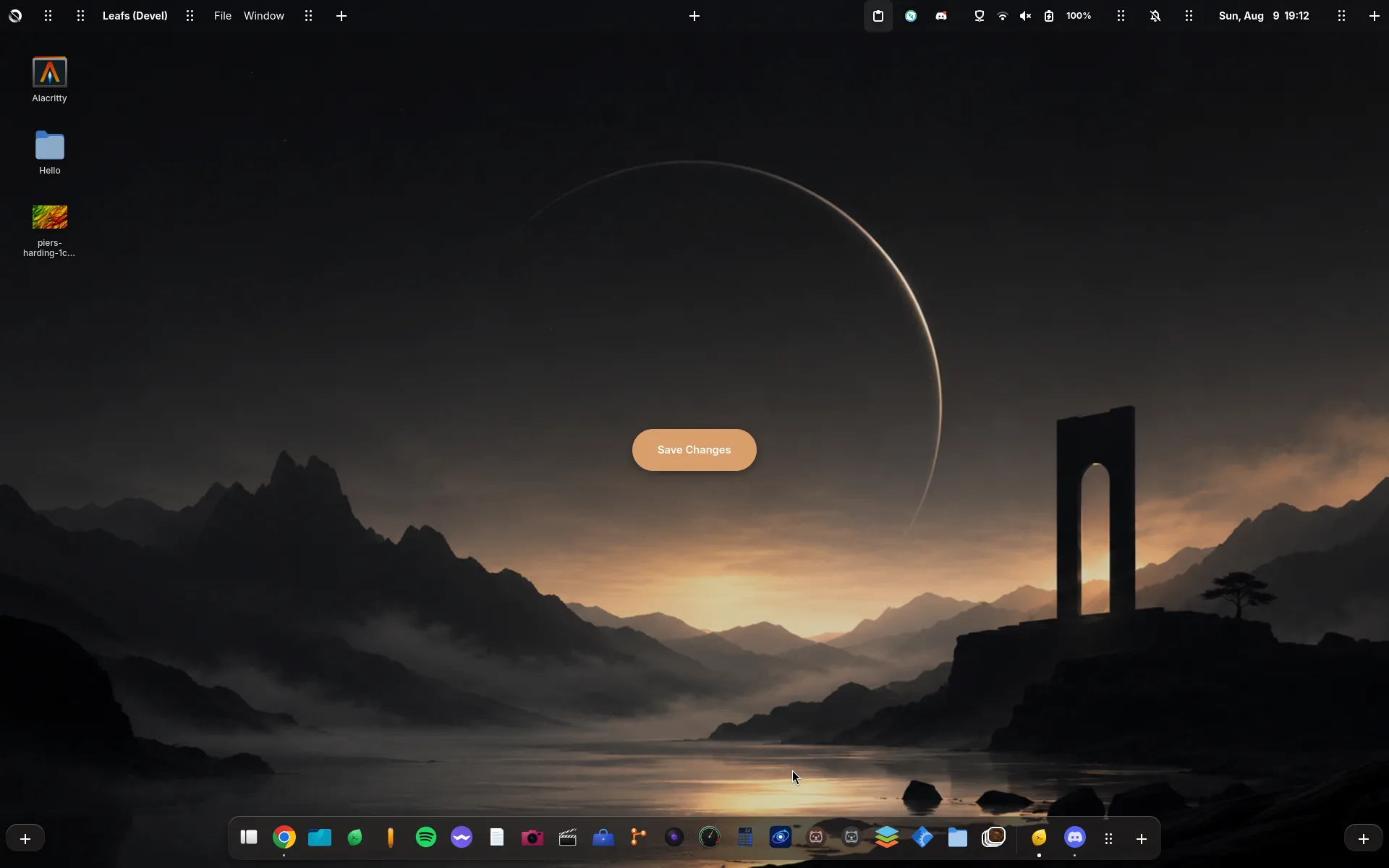
Adding something that already exists moves it instead of creating a second application list and waiting for GTK to decide which copy owns the widget, and the same rule applies to the clock and the other single desktop components. Empty side sections disappear again when editing ends, while a populated dock section becomes its own floating body instead of stretching an invisible container across the screen.
The default layout remains centered and existing saved layouts are normalized into the new model, so an upgrade should not quietly move the whole dock to the left, and getting there was considerably more work than drawing three boxes and calling it customization (github.com/…/issues/147).
A dock that gives the screen back
The dock had one old contradiction: in floating autohide mode it looked like a small body in the middle of the screen, but its Wayland surface still occupied the full width and the invisible empty area continued receiving input, so clicking beside the dock meant clicking the dock (github.com/…/issues/211).
Shrinking that input area sounds obvious until autohide needs an invisible strip at the screen edge to notice your pointer, and my first fix gave clicks back to applications but also made the hidden dock impossible to reveal. The final path keeps a dedicated edge sensor while limiting the visible dock’s input to its real shape, so a maximized window receives clicks around it and the dock still comes back when the pointer reaches the edge (github.com/…/issues/5).
The previews came back too: a stale hover state could leave the dock showing only a tooltip while the actual window capture was never requested again, so each request now captures a fresh frame and the hover path cannot quietly lose the preview after the first attempt (github.com/…/issues/192).
Two smaller lies are gone: restoring a minimized window no longer resizes it for one frame to dodge a dock that is already hidden (github.com/…/issues/79), and a Steam or Heroic game gets its own dock entry instead of being folded into the launcher that happened to start it (github.com/…/issues/42).
The rest of the computer exists too
My monitor arrangement is not everybody’s monitor arrangement, so Singularity now saves the position of the second display instead of rebuilding a different layout at login (github.com/…/issues/55). The Alt-Tab grid wraps correctly instead of turning two windows into a strange vertical strip (github.com/…/issues/126), and the app launcher can remain available even when the normal overview entry point is not (github.com/…/issues/218).
Disabling Wi-Fi no longer blocks the shell while it waits for nmcli, since the radio is changed through NetworkManager’s D-Bus property and the interface remains responsive while NetworkManager does the actual work (github.com/…/issues/73).
The theme also reaches further outside GTK: Qt applications follow the accent colour now (github.com/…/issues/119), Flatpak applications can find the Libsingularity GTK theme (github.com/…/issues/174), and the odd unthemed pieces inside Chromium-based browsers have been accounted for (github.com/…/issues/153). Krita’s top bar actions are also back after a session regression hid them (github.com/…/issues/145).
There are visible changes in the overview too: application folders now use the transparent blurred background the rest of the desktop already understands (github.com/…/issues/53), and the tiling preview rectangles animate into place instead of appearing as debug geometry (github.com/…/issues/121).
Files stopped waiting for permission to notice
Files had three versions of the same problem: the world changed, but the view did not.
A directory now updates when files are created, removed or renamed instead of requiring a manual visit somewhere else and back (github.com/…/issues/224), paste is available from the empty part of a folder where people actually right-click when the folder contains nothing (github.com/…/issues/225), and you can drag a file directly onto a folder in the sidebar (github.com/…/issues/223).
Desktop, Documents, Downloads and the other familiar folders now come from the XDG user directory configuration instead of English names baked into the shell, so if your home uses another language or a custom location, Singularity follows it (github.com/…/issues/226).
Still on it
The next large desktop item is scrolling tiling, in the style of Niri (github.com/…/issues/227), and the tiling protocol I already built can move, resize and mark windows as tiled, which is enough to prove the layout maths but not enough for the final behaviour.
Columns, scrolling, focus, gestures and interactive moves need one source of truth inside the compositor, which means extending our Labwc fork and leaving the shell in charge of settings and controls. I could fake most of it from the shell and produce a good ten-second recording, but the first real drag would expose every round trip I tried to hide, so I would rather build the part that has to survive daily use.
There will be a separate post when that work moves on screen, and this one stays with the less cinematic milestone: people installed the Alpha, found the assumptions hidden in my setup, and the desktop came back less dependent on them.
The operating system underneath changed just as much, with OTA, recovery, firmware and the no-TPM path covered in The Alpha learned to update itself.
If you run Singularity and something is off, tell me by opening an issue on GitHub or finding me on Discord, because the reports from machines that are not mine are still what keep this honest.